
For companies, universities and training providers
Train the people who already work with you.
Give your staff, students or clients their own sign-in and material only they can open. Pay for the people you teach.
- Named people, not open signup
- Single sign-on included
- Priced by headcount
Free to start on the marketplace terms. Named people and private content are on the paid plans.
How it works
Your people, trained, in three steps.
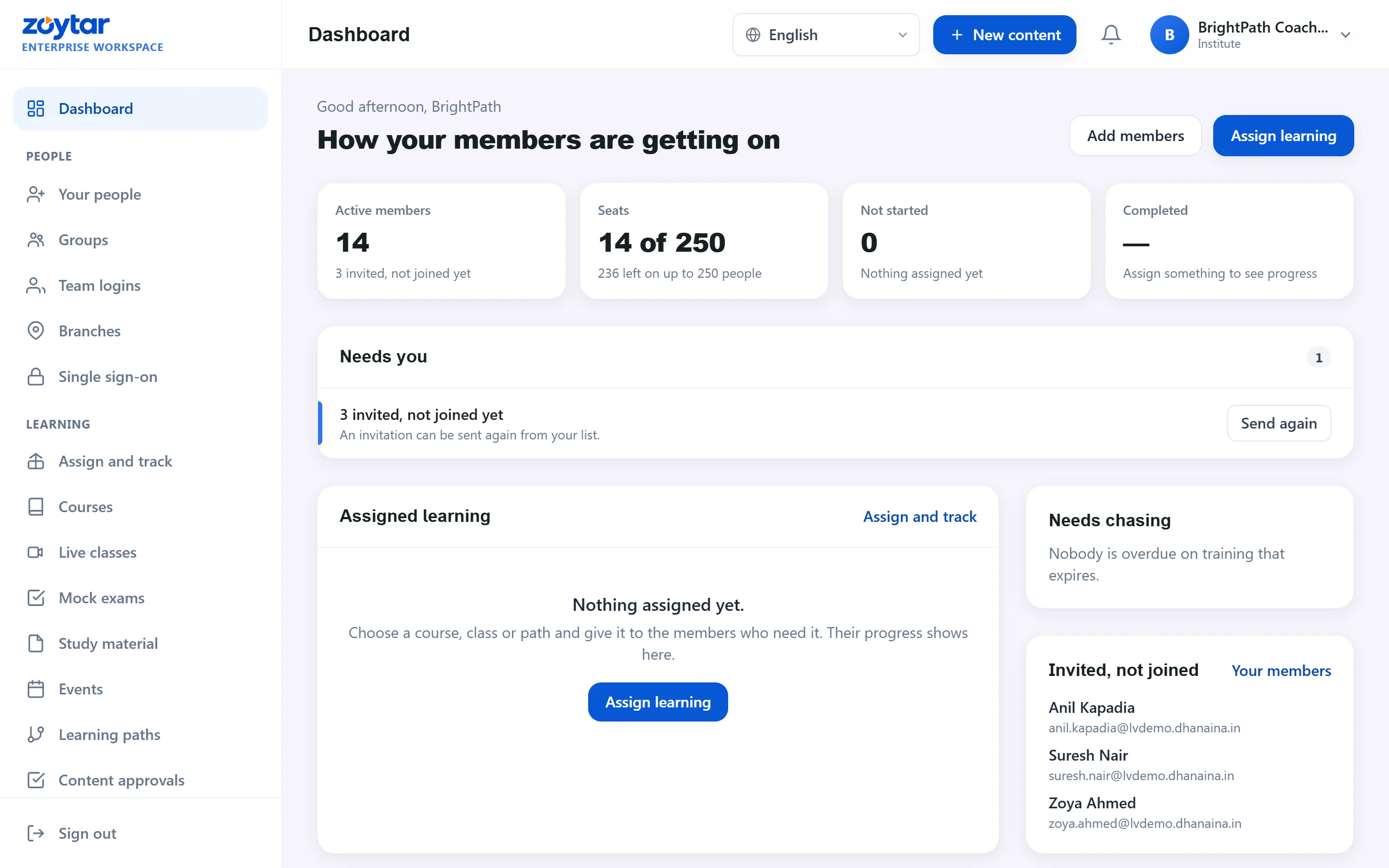
01 · Add your people
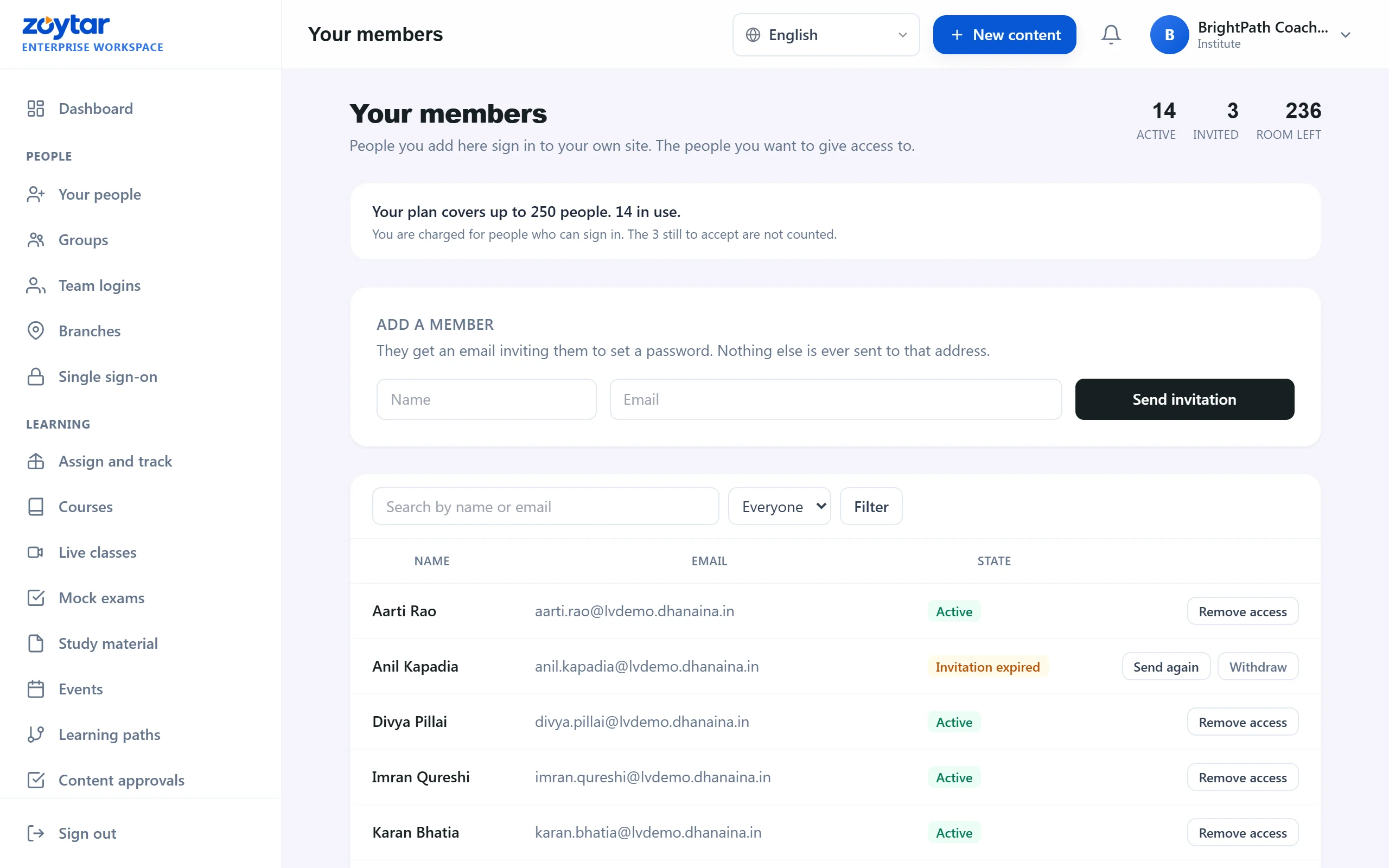
Invite them by email.
Each person gets one invitation to set a password. You are charged only for people who can sign in.
- Groups and branches
- Invitations you can resend or withdraw
- Remove access in one click
02 · Sign in
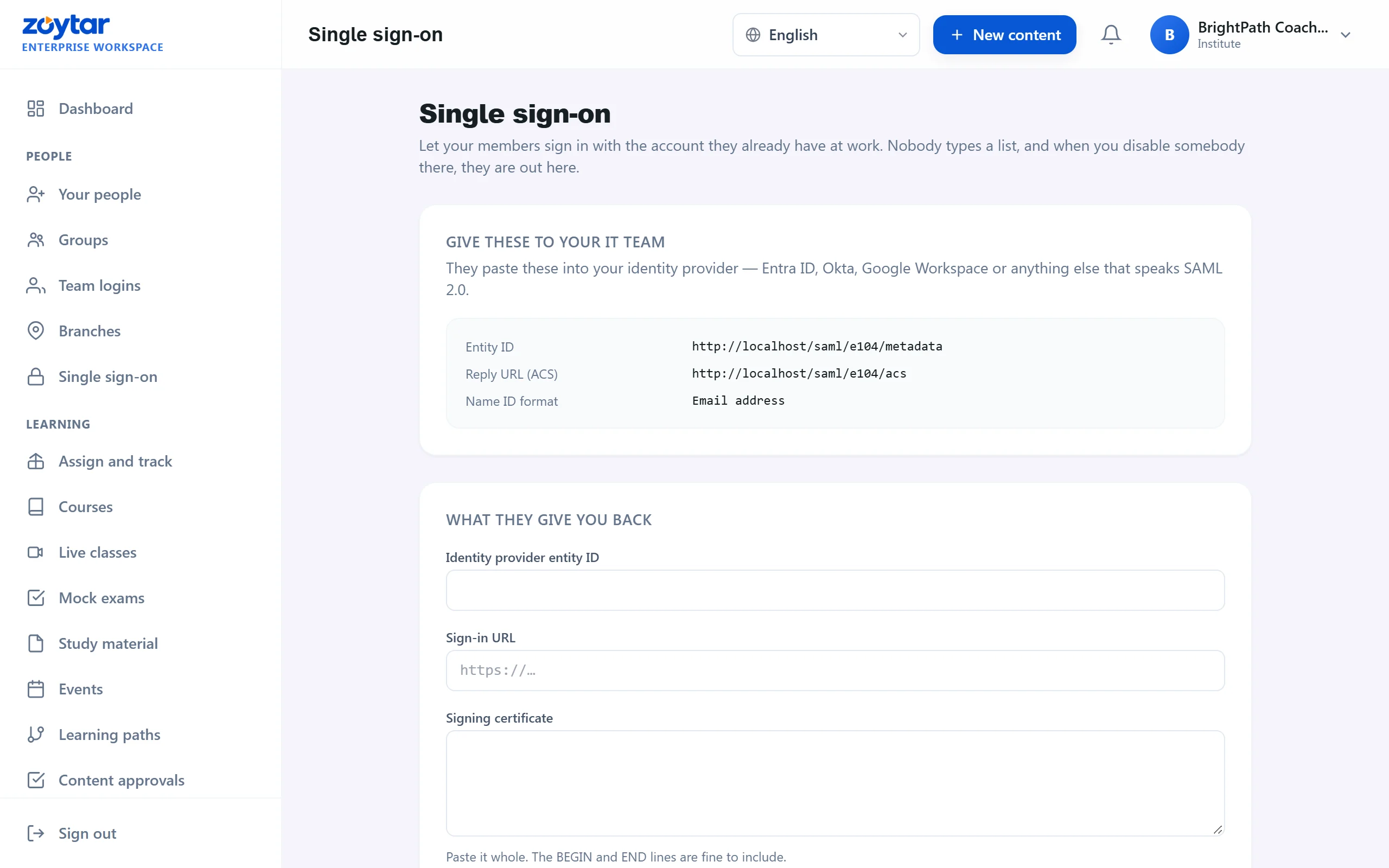
With the account they already have at work.
Your IT team pastes three values into Entra ID, Okta, Google Workspace or any SAML 2.0 provider.
- Nobody types a list
- Disabled at work means out here
- Any SAML 2.0 provider
03 · Assign
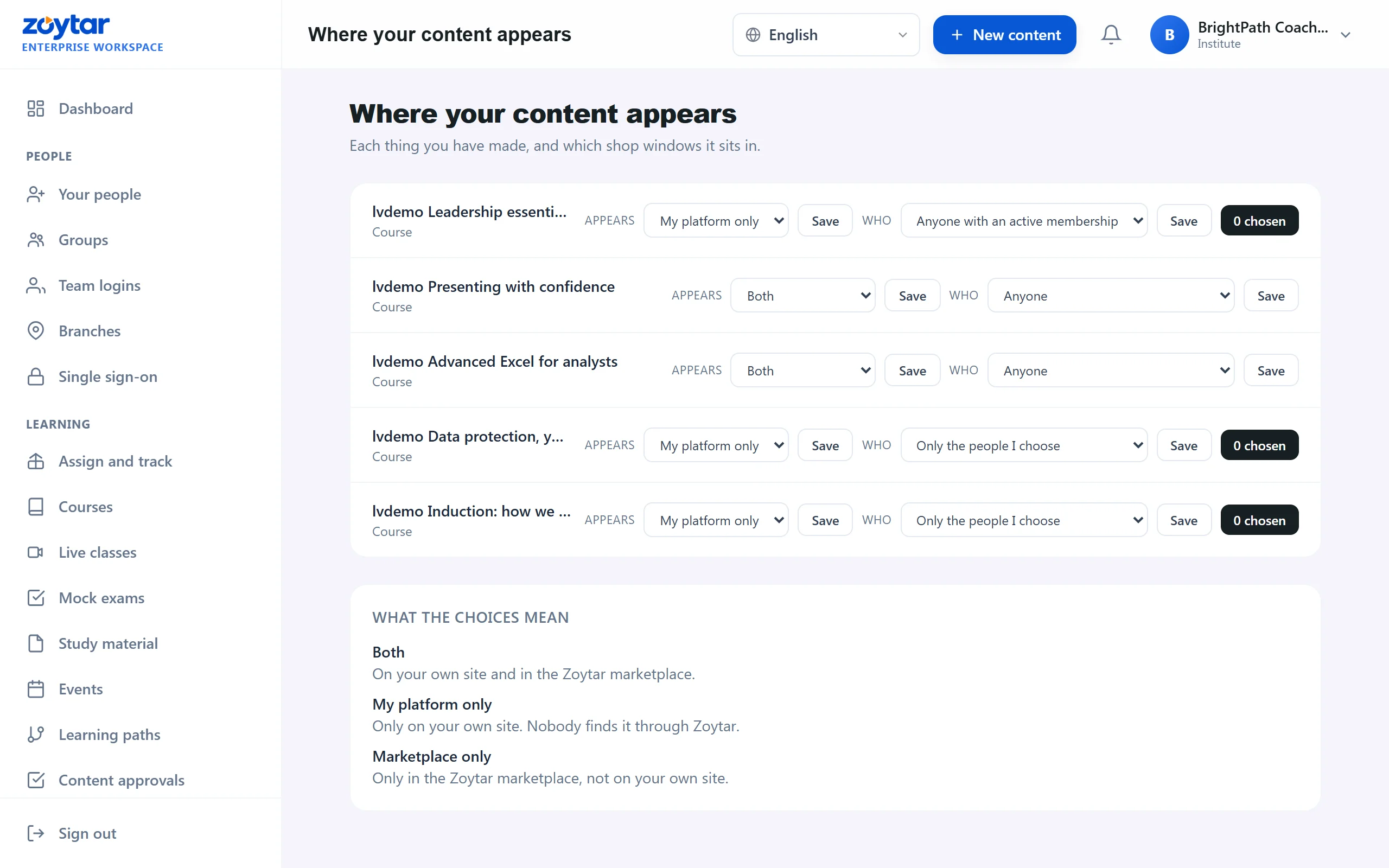
Private courses, for the people you choose.
Decide for each course who may open it: everyone, your members, or only the people you pick.
- Courses, live classes and study material
- Learning paths in the order you mean
- Content checked before it goes live
AI, built in
AI that works from your own material.
Every answer comes from your lessons, notes or catalogue — not from the open internet — and what it drafts stays a draft until you publish it.
- From your own material
- A draft until you publish it
- 8 jobs it does today
For course authors
- A course outline, its lessons and its description, drafted from your topic
- Lessons written from your outline, for you to edit
- Mock-exam questions drafted from your own lessons or notes
- A course translated into another language, as a draft copy
For your people
- A course tutor that answers only from the lessons they can open
- “Quiz me” — practice questions from one lesson
- Revision sheets condensed from the course itself
For sales and support teams
- Sales and support role-play, marked line by line against your own checklist
Getting people in
Two ways in, and neither is a public signup form.
Somebody is either invited by you or arrives through your own identity provider. Nobody can create themselves an account on your site, which is the point.
You add them
One at a time or from a spreadsheet you already keep. They get an invitation, set their own password, and appear on your list.
- You add a name and an email — or paste the list you already have.
- They are invited. Until they accept, they hold no seat and cannot sign in.
- They set a password and open exactly what you assigned them.
Or your own sign-in
Google Workspace, Microsoft Entra, or any SAML identity provider. Somebody who already has an account at work uses it here.
- An account is made the first time they sign in, not before.
- It resolves inside your organisation only — never against anybody else's people.
- Remove them from your directory and they stop getting in here too.
Every door into a piece of content, and there are only these
One gate answers “may this person open this?”, and it has exactly nine answers. Your administrators can see which one applied for any person and any item.
- You made it
- Platform staff
- Bought it
- Covered by a membership
- Being paid in parts
- A seat your team gave you
- Included in your zoytar+
- Assigned to you
- Part of a learning path you are on
Are they doing it
Who has started, who has finished, and who has not opened it.
Assigning something is the easy half. The half you will actually be asked about every month is whether anybody did it — so that is a screen, not an export you have to request.
Not started
Counted and named, not left for you to work out by subtracting. It is the number worth acting on, and a report should not make you do arithmetic to find the bad news.
In progress
Somebody has opened it. Different from having finished, and different again from never having looked — three states, because they need three different conversations.
Finished
The same test the certificate uses. Not a self-report, and not a second opinion that could drift away from what the learner was told.
Give it to a team, a cohort or a batch — not forty people one by one
Put people in a group and give the group the course or the path. Somebody who joins the group next month gets everything it already has on the day they join; somebody who leaves loses what the group gave them and keeps anything you gave them by name.
Bring your SCORM courses. They play, and they report back.
Upload a SCORM 1.2 or 2004 package to a course and your people open it inside that course, signed in as themselves. Where they stopped, what they scored and how long they spent come back per person and per module.
- It runs in its own sandbox
- It picks up where they left off
- Completed but failed is not completed
Who it is for
For every team that has to learn something.
The common thread is not the industry — it is that you know who your learners are before they arrive. That single fact changes the product: no open signup, no discovery, and content that is invisible to everybody else.
Employee onboarding
Give every new joiner the same courses and see who has finished.
Compliance training
Courses only your people can open, with a certificate when they pass.
Training institutes
Private batches for your enrolled students, each with their own sign-in.
Universities
Students and staff sign in with the university's own accounts.
Inside your own app In progress
Keep your own front end and run the learning behind it — the headless LMS.
Customer and partner academies
Train the people who buy from you or sell for you.
Any body that teaches a group it already knows.
Training your own staff.
Teaching your own enrolled students.
Teaching your own enrolled learners.
Delivering training to client organisations.
A body teaching its own defined group of people.
The problems it solves
What people tell us, and what zoytar does about it.
“We can’t prove who finished compliance training.”
Assign courses and paths to named people and export completion for the auditors.
“Our old SCORM courses won’t move to a new platform.”
Upload the SCORM package as it is; completion, score and time are recorded per person.
“Nobody wants another password.”
Your people sign in with the work accounts they already have.
“Renewals slip because nobody sees them coming.”
Training that expires shows who is due soon and who has lapsed, before an audit finds it.
“Training software is priced in dollars per head.”
Plans in rupees, by team size, from ₹3,999 a month for up to 50 people — with GST invoices.
“New joiners wait weeks for their first training.”
Hand them a learning path on day one; each step opens as they finish the last.
Show 2 more
“Managers can’t see how their team is doing.”
A dashboard of what was assigned, who started and who finished.
“A certification needs a real exam, not a quiz.”
Timed sections and negative marking, the way a certification exam is set.
Choosing between platforms? See how zoytar compares →
How zoytar compares
zoytar beside the corporate learning systems
Every rival fact is taken from that rival’s own website. “Not listed” means their site did not mention it on the day we checked — it may exist elsewhere, so ask them.
| Feature | zoytar | TalentLMS | 360Learning | Docebo | Edmingle |
|---|---|---|---|---|---|
| A published price in rupeesFrom ₹3,999 a month for up to 50 people | Yes: From ₹3,999 a month for up to 50 people | Partly: Published in US dollars | No: Price on request | No: Price on request | Yes |
| Sign-in with work accounts on every paid planEvery paid band | Yes: Every paid band | Yes | Partly: Marked as conditional | Not listed | Partly: Power plan |
| SCORM packagesSCORM 1.2 and 2004 | Yes: SCORM 1.2 and 2004 | Yes | Yes | Not listed | Partly: Prime plan |
| Training that expires, with who is due and who has lapsedNever done, lapsed and due soon, on the dashboard | Yes: Never done, lapsed and due soon, on the dashboard | Not listed | Not listed | Yes: Certification and compliance tracking | Not listed |
| Learning pathsWith a test between steps | Yes: With a test between steps | Yes | Not listed | Not listed | Not listed |
| Exam-style tests: negative marking, timed sectionsFor certification exams | Yes: For certification exams | Partly: Tests, with AI creation | Not listed | Not listed | Partly: Assessments |
| GST invoicesIssued in your company’s name | Yes: Issued in your company’s name | Not listed | Not listed | Not listed | Not listed |
| In your language16 Indian and international languages: English, Hindi, Tamil, Telugu, Kannada, Malayalam, Bengali, Arabic, French and 7 more | Yes: 16 Indian and international languages: English, Hindi, Tamil, Telugu, Kannada, Malayalam, Bengali, Arabic, French and 7 more | Not listed | Not listed | Partly: Multilingual training | Not listed |
- Yes
- Partly
- No
- Not listed
Read from each rival’s own website on 25 Sep 2026. Plans and prices change; check their site before you decide. All names and marks belong to their owners. Sources: TalentLMS, 360Learning, Docebo, Edmingle
Built in, on every product
The parts nobody sees, done properly.
Privacy, security, content protection and standards are part of the platform underneath every product — not an add-on, and not a promise. Where something is not finished, it says so.
Data privacy and GDPR
Export or erase what we hold about a person, with a published DPA and sub-processor list.
3 of 3 builtSecure by design
Every institution walled off from every other, a full audit trail, and sign-in with your work accounts.
4 of 5 built Not yetISO 27001, then SOC 2.Content protection
Encrypted video, a watermark with the viewer's name, and a way to trace a leak back to an account.
3 of 4 built Not yetWidevine and FairPlay DRM for players embedded in your own app.SCORM and learning standards
Bring the SCORM courses you already have, send what your people do to your own record store, and open your courses from your LMS.
4 of 4 builtAPI and integrations
Read and write a school's records from your own systems, with keys tied to a named person.
4 of 4 builtHeadless LMS
Keep your own app as the front end and run the learning behind it on zoytar. Part of zoytar Enterprise.
9 of 11 built In progressSDKs for JavaScript, Node.js and Python In progressZapier, Make and PabblyOn every phone
Installs from the browser to the home screen, with reading that works offline. No app store needed.
3 of 5 built Not yetThe same app listed in the Play Store. Not yetNative apps for Android and iPhone.In every language
Every screen, and everything the platform sends, in each person's own language.
4 of 6 built In progressEvery phrase translated into all 16 languages In progressWhatsApp templates approved in each languageIntegrations
Works with the tools you already use
Every one of these is built today. Anything not listed here, we have not built yet.
- Zoom On every plan Live classes create their own meeting; Google Meet also puts it in your Google Calendar.
- Google Meet On every plan Live classes create their own meeting; Google Meet also puts it in your Google Calendar.
- MT Microsoft Teams On every plan Live classes create their own meeting; Google Meet also puts it in your Google Calendar.
- YouTube On every plan Videos on the pages of your website.
- Vimeo On every plan Videos on the pages of your website.
- C Canva With Pro Your Canva designs on the pages of your website.
- Google Analytics With Creator Measure your own domain, for visitors who agree.
- Tag Manager With Creator Measure your own domain, for visitors who agree.
- Meta Pixel With Creator Measure your own domain, for visitors who agree.
- Mailchimp With Creator Your followers on your own mailing list, kept up to date every hour.
- Brevo With Creator Your followers on your own mailing list, kept up to date every hour.
- K Kit With Creator Your followers on your own mailing list, kept up to date every hour.
- O Outlook On every plan Your classes, events and booked sessions in your own calendar app, kept up to date.
- GC Google Calendar On every plan Your classes, events and booked sessions in your own calendar app, kept up to date.
- AC Apple Calendar On every plan Your classes, events and booked sessions in your own calendar app, kept up to date.
- C Calendly With Creator A "Book a time" button on your page that opens your Calendly.
- W WhatsApp With Creator A chat button on your page, and your WhatsApp group for people who bought from you.
- OB Open Badges 3.0 On every plan Each certificate your learners earn, also as a signed credential for a digital wallet or an employer.
- T Tally With Pro Your sales, refunds and the money paid to you, as vouchers and journals your accountant imports.
- Zoho Books With Pro Your sales, refunds and the money paid to you, as vouchers and journals your accountant imports.
- QuickBooks With Pro Your sales, refunds and the money paid to you, as vouchers and journals your accountant imports.
- Xero With Pro Your sales, refunds and the money paid to you, as vouchers and journals your accountant imports.
- S Sage With Pro Your sales, refunds and the money paid to you, as vouchers and journals your accountant imports.
- HubSpot With Pro Learning activity on each customer's record in your CRM, and your enquiries added as leads.
- S Salesforce With Pro Learning activity on each customer's record in your CRM, and your enquiries added as leads.
- Zoho CRM With Pro Learning activity on each customer's record in your CRM, and your enquiries added as leads.
- P Pipedrive With Pro Learning activity on each customer's record in your CRM, and your enquiries added as leads.
- L LeadSquared With Pro Learning activity on each customer's record in your CRM, and your enquiries added as leads.
- S Slack With Business What matters about your people, posted to your own channel.
- Discord With Pro The same alerts, in your community's Discord server or Telegram group.
- Telegram With Pro The same alerts, in your community's Discord server or Telegram group.
- Zendesk With Business A ticket reply or help article that opens the right course, counted.
- F Freshdesk With Business A ticket reply or help article that opens the right course, counted.
- S ServiceNow With Business A ticket reply or help article that opens the right course, counted.
- Moodle With Business Your courses inside the LMS your customers already use.
- Canvas With Business Your courses inside the LMS your customers already use.
- B Blackboard With Business Your courses inside the LMS your customers already use.
- Your own payment gatewayCreatorBuyers pay straight into your own payment account, on your own terms.
- Your own email providerProMail to your learners sent from your own address, through your own mail server.
- Single sign-on and SCIMBusinessYour people sign in with SAML or OpenID Connect; Entra ID and Okta add and remove them.
- Your own Learning Record StoreBusinessYour people's xAPI statements sent to your own Learning Record Store
- API and webhooksProYour own product creates learners and groups here, and hears what happens to them.
All names and marks belong to their owners, and are shown only to say what zoytar connects to.
What it costs
Priced by how many people you teach.
Not per feature, not per course, not per administrator. Every plan does everything the product does; the only thing that changes is how many people you have on it.
Prices are before GST, which is added at 18% when you pay.
| People | A month | A year | Per person, a month | Choose |
|---|---|---|---|---|
| Up to 50 people | ₹3,999 | ₹39,990 | ₹79.98 at capacity | Choose |
| Up to 250 people | ₹6,999 | ₹69,990 | ₹28 at capacity | Choose |
| Up to 1,000 people | ₹12,999 | ₹1,29,990 | ₹13 at capacity | Choose |
| Up to 2,500 people | ₹24,999 | ₹2,49,990 | ₹10 at capacity | Choose |
| More than 2,500 people | Let us talk | — | — | Ask us |
What counts as a person
An account that can currently sign in. Somebody you have invited but who has not accepted does not count, and neither does somebody you have blocked — so the number you are billed for is the number of people actually being taught.
Starting free
A free account works exactly like an individual educator's: you can publish and sell on the marketplace and keep the same share. Named people, private content and single sign-on are what the paid plans add.
On the paid plans
Everything, on every band.
- Your own web address
- Your name on it, not ours
- Your buyers are yours, not ours
- Choose what appears on the marketplace
- Your own payment account and your own tax
- Google Analytics, Tag Manager and Meta Pixel on your own domain
- Your followers kept on your Mailchimp, Brevo or Kit list
- A "Book a time" button to your Calendly on your page
- A WhatsApp chat button on your page, and your WhatsApp group for buyers
- Add your own people, who sign in to your site
- Content only your own people can open
- Enquiries: leads, counsellors, follow-ups and demo classes
- We take the payments and handle the tax
- Learning activity and enquiries in your CRM: HubSpot, Salesforce, Zoho CRM, Pipedrive or LeadSquared
- Alerts in your Discord server or Telegram group
- Canva designs on the pages of your website
- Your sales, refunds and the money paid to you, for Tally, Zoho Books, QuickBooks or Xero
- Emails from your own address
- Voice announcements to your people, through your own calling provider
- Your own single sign-on
- Alerts in your Slack or Microsoft Teams
- Your people's xAPI statements sent to your own Learning Record Store
- Your courses inside Moodle, Canvas and other LMSs, by LTI 1.3
- Role-play practice: your people rehearse sales and support conversations with the assistant
- Courses linked from your Zendesk, Freshdesk or ServiceNow tickets and articles
In your language
Every page, in 16 languages.
Learners, educators, staff and parents each choose their own — Indian and international, right to left included.
 English
 हिन्दी
- தமிழ்
- తెలుగు
- മലയാളം
- ಕನ್ನಡ
- বাংলা
 العربية
 Français
 Deutsch
 Español
 Português
 Bahasa Indonesia
 Türkçe
 日本語
 한국어
Built and building
What is live, and what comes next.
Read from our build roadmap and updated as each piece ships. Everything below is either in use today or on the plan, in build order.
14 live 3 being built 4 coming next
- Several academies under one account
- Client and partner companies inside an academy
- Onboarding journeys with due dates
- Skills and recertification
- Instructor-led sessions with attendance
- A customer academy, free or paid
- Certificates anyone can verify
- APIs for learners, enrolments and content
Show 6 more
- An embeddable player for your own app
- SDKs for JavaScript, Node.js and Python
- Partner, member and franchise academies
- LTI 1.3 and cmi5
- Teams and Slack notifications
- AI role-play for sales and support
- HR system sync — Darwinbox, Keka, Workday and more
- CRM sync — Salesforce, HubSpot, Zoho CRM
- API keys, scopes and usage metering
- A ready-made course library
- DRM for embedded players
- Your own encryption keys, SOC 2 and ISO 27001
- Mobile-first onboarding for frontline teams
Good to know
What buyers ask us
What exactly am I billed for?
Can our staff sign in with their work account?
We already have courses in SCORM. Can we use them?
Can we assign to a whole team rather than person by person?
Is our content visible to anybody outside our organisation?
Can we sell to the public as well as train our own people?
What happens if we go over our band?
Do you sell our people anything?
Not quite what you need?
zoytar for Educators
Sell courses and classes on your own terms.
zoytar ERP
Run a school or college end to end.
Comparing all three? Start here. Looking to learn rather than teach? Browse courses.
“We onboard drivers and warehouse staff across twelve locations. Single sign-on and assigned learning paths mean new joiners start training on day one.”
Put your first twenty people on it.
Start free, add the people you already know, and move to a paid band when you want the private side of it. There is nothing to migrate when you do.
No card to start. Priced by people, not by feature.
